Propper Sign Adds AI Field Detection, Turning Signature Setup Into a Review Step
Suggest Fields scans uploaded PDFs for signature, date, name, text and choice fields. Nothing is placed until the
Press Release Disclaimer: This is a press release distributed through the XPR Media network. It has not been independently verified by our newsroom.
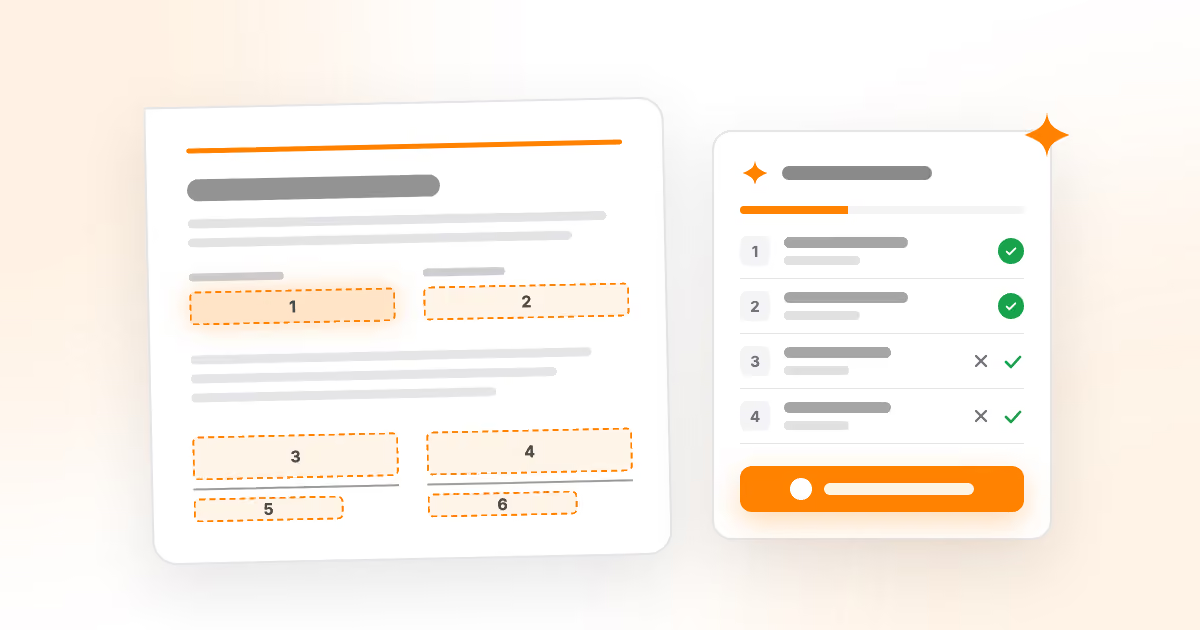

Suggest Fields scans uploaded PDFs for signature, date, name, text and choice fields. Nothing is placed until the sender accepts it. Included for FREE!
ALPHARETTA, GA, UNITED STATES, September 22, 2026 /EINPresswire.com/ — PropperDocs, Inc., maker of Propper AI®, an AI-native intelligent document platform, today announced the general availability of Suggest Fields in Propper® Sign™. The AI-assisted feature scans an uploaded PDF and proposes the fields a signer has to touch signatures and initials, signing and signer-entered dates, printed names and editable text, and checkbox and Yes/No choice groups, converting manual field placement into a review step. Suggest Fields has been available to customers since September 10.
Preparing an agreement for signature has long meant locating every blank by hand, drawing a field, sizing it and assigning it to a recipient. Assuming roughly 20 seconds per field, an eight-field services agreement takes under three minutes to tag manually, while an 80-field application can run close to half an hour without an existing template. Suggest Fields addresses that setup work directly.
In the Prepare step, senders click Suggest Fields. Each finding appears as a numbered box on the document and a row in an adjacent panel, grouped by type. Senders can accept a row, accept a group, correct a field type from a dropdown, dismiss an incorrect finding, or add all remaining fields at once. On mobile, the review panel opens as a sheet from the bottom of the screen.
The feature is built around sender control. Nothing is added to an agreement until it is accepted, and there is no setting that skips review. The model does not assign recipients, senders choose the signer. Accepted suggestions become ordinary Propper Sign fields that can be moved, resized, deleted or undone as a batch, and the existing field palette works unchanged. Organizations that prefer not to use AI features can have Suggest Fields disabled on request.
“Automating a chore is only useful if the person still signs off on the result,” said Jack Berube, founder and CEO of PropperDocs, Inc. “Suggest Fields does the searching. The sender makes every decision that reaches a signer.”
Analysis runs on a temporary copy of the uploaded PDF using Google Gemini, with responses constrained to structured field types, coordinates and choice groups and validated by Propper before display. The uploaded document is not modified, and unaccepted suggestions are never written to the saved agreement. Google Cloud Platform is a listed subprocessor in Propper’s data processing agreement. Suggest Fields supports unlocked draft agreements owned by the sender, for PDFs up to 20 pages and 10 MB.
Suggest Fields carries no additional charge. An agreement prepared with it costs the same as one tagged by hand under Propper’s pay-per-completed-document pricing, with no separate AI credits to purchase.
Availability
Suggest Fields is live for Propper Sign customers today. The Business plan is free for 14 days with no credit card, and includes unlimited users and full API access. Details: https://propper.ai/products/sign
About Propper
PropperDocs, Inc. builds Propper AI®, an AI-native intelligent document platform spanning document generation, template building, e-signature, clickwrap and secure storage through Propper Doc Gen™, Propper Fabrik™, Propper Sign™, Propper Click™ and Propper Locker™. Propper maintains a SOC 2 Type II audit and a HIPAA Ready posture, with a Business Associate Agreement available on request. Headquartered in Alpharetta, Georgia.
Propper PR & Communications
PropperDocs, Inc
+1 404-491-1901
email us here
Visit us on social media:
LinkedIn
Legal Disclaimer:
EIN Presswire provides this news content “as is” without warranty of any kind. We do not accept any responsibility or liability
for the accuracy, content, images, videos, licenses, completeness, legality, or reliability of the information contained in this
article. If you have any complaints or copyright issues related to this article, kindly contact the author above.

Media gallery